Product Specifications for Logitech MK345 Wireless Combo, Full-Size Keyboard with Palm Rest, Spill-Resistant
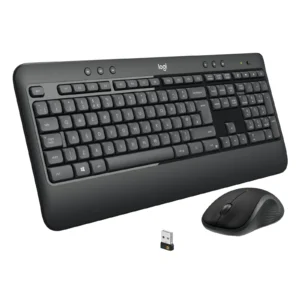
Product Overview: Boost your workspace productivity and typing comfort with the Logitech MK345 combo. Featuring the Logitech MK345 focus keyword setup, this full-size wireless keyboard and optical mouse combination offers exceptional battery life, a comfortable padded palm rest, and a spill-resistant design for reliable daily use.
Features & Specs - Connectivity Technology: 2.4GHz Wireless via USB Nano Receiver
Features & Specs - Wireless Range: Up to 10 meters
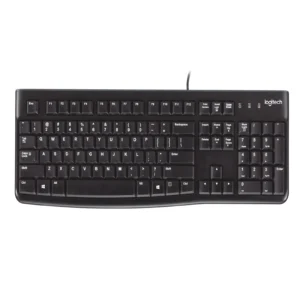
Features & Specs - Keyboard Layout: Full-Size with Number Pad
Features & Specs - Palm Rest: Integrated Textured Padded Palm Rest
Features & Specs - Keyboard Height: Adjustable Tilt Legs
Features & Specs - Spill-Resistant Design: Yes (Tested up to 60ml liquid spillage)
Features & Specs - Media Control: 12 Enhanced Media and F-Keys
Features & Specs - Keyboard Battery Life: Up to 3 Years
Features & Specs - Keyboard Battery Type: 2 x AAA Batteries (Included)
Features & Specs - Keyboard Power Switch: Yes, On/Off Switch
Features & Specs - Mouse Sensor Technology: Optical Tracking
Features & Specs - Mouse Resolution (DPI): 1000 DPI
Features & Specs - Mouse Design: Contoured Right-Hand Shape
Features & Specs - Mouse Battery Life: Up to 18 Months
Features & Specs - Mouse Battery Type: 1 x AA Battery (Included)
Features & Specs - Mouse Power Switch: Yes, On/Off Switch
Features & Specs - Receiver Storage: Storage slot inside mouse battery compartment
Features & Specs - Plug and Play: Yes
Features & Specs - Compatible Operating Systems: Windows Vista, Windows 7, Windows 8, Windows 10, Windows 11, Chrome OS
Features & Specs - Encryption: 128-bit AES Wireless Encryption
Features & Specs - Indicator Lights: Caps Lock LED indicator
Features & Specs - Special Keys: Music control, Volume up/down, Mute, Web home, Email, PC sleep, Calculator
Features & Specs - Typing Noise: Low-profile whisper-quiet keys
Features & Specs - Scroll Wheel: Standard mechanical scroll wheel
Features & Specs - Number of Mouse Buttons: 3 (Left Click, Right Click, Middle Click with Wheel)
Features & Specs - Receiver Type: USB Nano Receiver
Features & Specs - Interface: USB Port
Features & Specs - Power Source: Battery Operated
Features & Specs - Hand Orientation: Right-Handed Mouse, Ambidextrous Keyboard
Features & Specs - Target Device: PC, Laptop, Desktop Computer
Item details - Brand: Logitech
Item details - Model: MK345
Item details - SKU: 920-012926
Item details - MFN Part Number: 920-012926
Item details - Manufacturer: Logitech
Item details - Categories: Logitech > Logitech Keyboard
Item details - Tags: Logitech MK345 combo
Item details - Country of Origin: Designed in Switzerland, Manufactured in China
Item details - Item Model Number: MK345 Wireless Combo
Measurements - Number of Items: 1 Combo Set (Keyboard and Mouse)
Measurements - Item Weight: Standard Desktop Combo Weight
Measurements - Unit Count: 1 Unit
Measurements - Product Dimensions: Full-Size Desktop Form Factor
Measurements - Package Dimensions: Retail Box Packaging
Additional details - Color: Black
Additional details - Enclosure Material: Durable High-Grade Plastic
Additional details - Form Factor: Desktop Full-Size
Additional details - Style: Ergonomic with Palm Rest
Additional details - Theme: Office and Productivity
Additional details - Finish Type: Matte and Textured Finish
User guide - Usage Instructions: Insert batteries, plug the USB nano receiver into an available USB port on your computer, and begin typing immediately.
User guide - Installation: Plug-and-play setup; no additional software or driver installation required.
User guide - Care Instructions: Clean with a soft dry cloth or compressed air. Avoid submerging in liquid despite spill resistance.
User guide - Safety Warnings: Keep away from extreme heat sources. Do not mix old and new batteries.
User guide - Maintenance: Turn off power switches during prolonged periods of non-use to further extend battery life.
User guide - Certification: CE, FCC, RoHS compliant
User guide - Compatibility Notes: Fully compatible with Windows and Chrome OS. Basic functionality supported on Mac OS.
User guide - Operating Temperature: 0°C to 40°C
Use Cases - Best For: Office work, home productivity, typing-heavy tasks, and multimedia control.
Use Cases - Ideal Scenarios: Desktop workstation setups, student dorms, corporate office environments, and home study areas.
Use Cases - Target Audience: Professionals, students, writers, and home PC users looking for reliable wireless peripherals.
Use Cases - Compatible With: Desktop PCs, Laptops, All-in-One computers running Windows or Chrome OS.
Use Cases - Not Recommended For: Competitive fast-paced gaming or multi-device Bluetooth switching setups.
Pros & Cons - Pros: Extremely long battery life (up to 3 years for keyboard, 18 months for mouse)
Pros & Cons - Pros: Integrated textured palm rest reduces wrist fatigue during long sessions
Pros & Cons - Pros: Spill-resistant keyboard design protects against accidental liquid splashes
Pros & Cons - Pros: 12 enhanced F-keys provide instant access to media playback and volume control
Pros & Cons - Pros: Reliable 2.4GHz wireless connection with a dependable 10-meter range
Pros & Cons - Cons: Mouse is molded exclusively for right-handed users
Pros & Cons - Cons: Single shared USB nano receiver cannot be easily replaced if lost
Pros & Cons - Cons: Lacks Bluetooth connectivity for direct pairing with mobile tablets or phones
Box Contents - Main Unit: Full-Size Wireless Keyboard with Palm Rest
Box Contents - Mouse Unit: Contoured Wireless Mouse
Box Contents - Receiver: USB Nano Receiver
Box Contents - Batteries: 2 x AAA Batteries (Keyboard), 1 x AA Battery (Mouse)
Box Contents - Documentation: User Documentation and Setup Guide
Warranty & Support - Warranty Period: 1-Year Limited Hardware Warranty
Warranty & Support - Warranty Type: Manufacturer Warranty
Warranty & Support - Coverage: Defects in materials and workmanship under normal use
Warranty & Support - Support Contact: Logitech Customer Support Online Portal
Warranty & Support - Customer Service Hours: Available via official Logitech support channels
Warranty & Support - Service Locations: Authorized Logitech service centers nationwide







 No products in the cart.

Write a review