
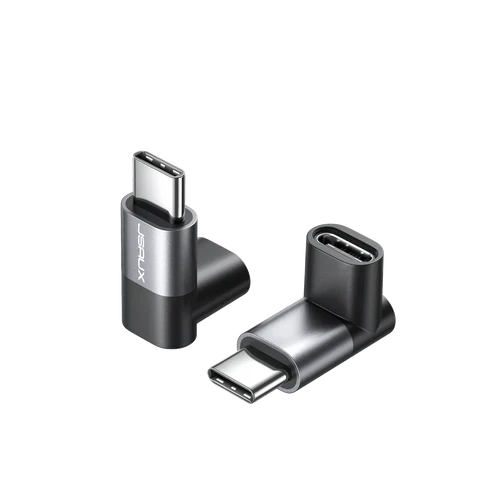
JSAUX 90 Degree USB-C Right Angle Adapter 2-Pack | 100W Charging & 40Gbps Data | 4K@60Hz Video | Aluminum Shell
Solve cable clutter and protect your valuable devices with the JSAUX 90-Degree USB-C Right Angle Adapter 2-Pack. This ingenious adapter is designed to create a low-profile connection that directs the cable up or down, eliminating awkward bends that can damage your device’s port over time. It’s perfect for use with phones in cases, laptops on crowded desks, or game consoles where a protruding cable is a nuisance. But it’s more than just a angle saver; it’s a full-function adapter that supports super-fast 100W charging for laptops like MacBook Pro, incredible 40Gbps data transfer with Thunderbolt 3 devices, and 4K@60Hz video output to modern monitors. The high-quality aluminum shell ensures stable performance during high-power tasks and withstands daily use. This great-value 2-pack lets you organize multiple setups. To achieve the advertised 40Gbps speed, ensure you use a compatible Thunderbolt 4 Cable.
Specifications
- Brand & Model: JSAUX DD0008 USB-C Right Angle Adapter
- Connection: USB-C Male to USB-C Female (90-Degree Angle)
- Max Power Delivery: 100W
- Max Data Speed: 40 Gbps (Thunderbolt 3)
- Video Support: 4K @ 60Hz
- Construction: Aluminum Alloy Shell
- Contents: 2 Adapters in one pack
What’s in the Box
- 2 x JSAUX 90-Degree USB-C Adapters
- User Manual
FAQs
1. Will this adapter work with my Samsung/iPhone 15 for charging?
Yes, it is fully compatible for charging any device with a USB-C port, including Samsung phones and the iPhone 15 series. It will support the fastest charging speed your device and charger allow.
2. How do I achieve the 40Gbps data transfer speed?
To reach 40Gbps, you need a Thunderbolt 3 or 4 certified cable and a storage device (like an NVMe SSD enclosure) that also supports Thunderbolt speeds. The adapter itself will not increase the speed of standard USB-C cables.
3. Can I use this with my USB-C monitor for video?
Yes, if your laptop or phone has a USB-C port that supports video output (DisplayPort Alt Mode), this adapter can transmit a 4K@60Hz signal to your USB-C monitor, carrying both video and audio.
4. Why is the aluminum shell important?
The aluminum shell is crucial for heat dissipation, especially during high-power 100W charging or fast data transfers. It prevents the adapter from overheating and ensures long-term reliability and safety.
5. Does it support Thunderbolt 4?
Yes, it is compatible with Thunderbolt 4 and Thunderbolt 3 protocols, allowing for the full 40Gbps data speed and video output when used in a Thunderbolt-certified setup.
6. Is the angle fixed, or can it rotate?
This adapter has a fixed 90-degree angle. The 2-pack may include adapters with different orientations (e.g., one pointing up, one down) to suit various setup needs.
7. Will it work with a USB-C to HDMI cable?
Yes, you can connect a USB-C to HDMI cable (or any other USB-C peripheral) to the female end of this adapter, effectively making it a right-angle extension for that cable.
8. Is it compatible with the Steam Deck or ROG Ally?
It is generally compatible for charging and data. However, note that it may not enable the full 30W Turbo Mode on the ROG Ally,
as this can depend on the specific charger used. It is not compatible with the AYA NEO console.
9. Can I use both adapters at the same time on one device?
While technically possible, daisy-chaining them is not recommended as it can decrease signal integrity and potentially reduce charging speed or data rates.
10. Does this adapter support USB 2.0 or 3.2 speeds?
Yes, it is backward compatible with all previous USB standards, including USB 2.0 and USB 3.2. It will operate at the highest speed supported by your cable and connected devices

 No products in the cart.

Write a review