UNITEK USB3.0 to SATA6G Docking Station Supports 2.5″/3.5″ HDD/SSD Hot Swappable ₨ 13,500.00
Description

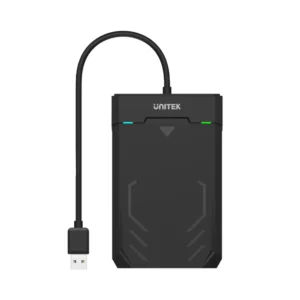
UNITEK Y-1078 USB 3.0 Hard Drive Docking Station SATA 6G, Supports 2.5″/3.5″ HDD/SSD, Plug-and-Play, Hot Swappable, LED Indicator, ON/OFF Switch (Black)


The UNITEK Y-1078 USB 3.0 Hard Drive Docking Station is the perfect solution for accessing and managing your 2.5″ and 3.5″ SATA HDDs and SSDs. Whether you’re backing up data, cloning drives, or transferring files, this docking station offers fast and reliable performance.

With USB 3.0 SuperSpeed support, the Y-1078 delivers data transfer speeds of up to 5Gbps, ensuring quick and efficient file transfers. It is compatible with SATA III, SATA II, and SATA I drives, making it versatile for a wide range of storage devices. The docking station supports both 2.5″ and 3.5″ drives, allowing you to use it with HDDs and SSDs.

The UNITEK Y-1078 features a plug-and-play design, requiring no software installation. Its hot-swappable functionality allows you to easily swap drives without restarting your computer. The built-in LED indicator shows power and activity status, while the ON/OFF switch ensures safe power management.

Compact and durable, this docking station is ideal for home, office, or professional use. It comes with a USB 3.0 data cable (1.2M) and a 12V/2A power adapter, providing everything you need to get started.

Specifications

  • Dimensions: 138mm x 63.3mm x 82.3mm
  • Power Input: 12V/2A (included power adapter)
  • Supported Drives: 2.5″ and 3.5″ SATA HDD/SSD
  • Data Transfer Speeds:
    • USB 3.0: Up to 5Gbps
    • SATA III: Up to 6Gbps
  • Features: LED indicator, ON/OFF switch, hot-swappable
  • Color: Black
  • Package Contents:
    • 1 x USB 3.0 to SATA 6G Docking Station
    • 1 x USB 3.0 Data Cable (1.2M)
    • 1 x 12V/2A Power Adapter

FAQs

What types of drives are compatible with this docking station?

It is compatible with 2.5″ and 3.5″ SATA HDDs and SSDs.

Does this docking station support USB 3.0?

Yes, it supports USB 3.0 SuperSpeed with data transfer speeds of up to 5Gbps.

Can I use this docking station to clone drives?

Yes, you can use it to clone drives by connecting both the source and target drives to the docking station.

Is the docking station hot-swappable?

Yes, it supports hot swapping, allowing you to change drives without restarting your computer.

Does the docking station include a power adapter?

Yes, it comes with a 12V/2A power adapter.

What is the purpose of the LED indicator?

The LED indicator shows the power and activity status of the docking station.

Can I use this docking station with a Mac?

Yes, but ensure the drive’s file system is compatible with macOS (e.g., HFS+, exFAT). macOS cannot write to NTFS drives without additional software.

What is included in the package?

The package includes 1 x USB 3.0 to SATA 6G Docking Station, 1 x USB 3.0 Data Cable (1.2M), and 1 x 12V/2A Power Adapter.

Can I use this docking station to duplicate an internal hard drive?

Yes, but you need to remove the internal hard drive from your computer and connect it directly to the docking station.

How do I initialize a new hard drive in Windows or macOS?

  1. Windows: Use Disk Management to initialize and partition the drive.
  2. macOS: Use Disk Utility to initialize and partition the drive.

Troubleshooting Tips

Data on Drive Not Accessible

  1. Test the drive with another computer or docking station to check for damage.
  2. Ensure the drive’s file system is compatible with your operating system (e.g., NTFS for Windows, HFS+ for macOS).
  3. If the drive is from a RAID array, it may not be accessible without the RAID controller.

Windows Does Not Detect the USB Device

  1. Press Windows Key + R, type devmgmt.msc, and press Enter.
  2. Under Universal Serial Bus controllers, check if the docking station is listed without an exclamation mark.

Initializing a New Hard Drive in Windows

  1. Press Windows Key + R, type compmgmt.msc, and click Run.
  2. Navigate to Disk Management, initialize the disk, and create a partition.

Initializing a New Hard Drive in macOS

  1. Open Finder -> Applications -> Utilities -> Disk Utility.
  2. Select the new drive, click Partition, and follow the prompts to create a partition.
Specification

Discover fast and reliable data management with the UNITEK Y-1078 Hard Drive Docking Station Price in Pakistan. Engineered for high-speed file transfers, backups, and drive cloning, this versatile docking station supports both 2.5-inch and 3.5-inch SATA HDDs and SSDs. Featuring USB 3.0 SuperSpeed capabilities, plug-and-play functionality, and a dedicated ON/OFF power switch, the UNITEK Y-1078 delivers seamless performance for professionals and home users alike.

⚡ Features & Specs
Connector TypeUSB Type-B to Type-A, SATA Slot
Compatible Devices2.5" & 3.5" SATA I/II/III HDDs and SSDs
Input Voltage100-240V AC
Amperage2A
Output Voltage12V DC
Power SourceExternal Power Adapter
Connectivity TechnologyWired USB 3.0
Special FeaturesHot-Swappable, Plug-and-Play, LED Power & Activity Indicator, ON/OFF Power Switch
MaterialDurable Engineering Plastic
ColorBlack
Data Transfer Rate (USB)Up to 5Gbps (SuperSpeed USB 3.0)
Data Transfer Rate (SATA)Up to 6Gbps (SATA III)
Backward CompatibilityUSB 2.0 (480Mbps), USB 1.1 (12Mbps), SATA II/I
Supported File SystemsNTFS, exFAT, HFS+, FAT32
OS CompatibilityWindows, macOS, Linux
Drive Capacity SupportSupports high-capacity 2.5" & 3.5" drives
LED Status IndicatorBlue LED for Power, Flashing Blue for Data Activity
Power ManagementManual ON/OFF Rocker Switch
Plug TypeStandard Regional Wall Plug
Data Cable TypeUSB 3.0 Type-A to Type-B Cable
Cable Length1.2 Meters
Chassis DesignVertical Slot-In Dock
Hot Swap SupportYes, swap drives without rebooting
Driver RequirementNone (Driverless Installation)
Overcurrent ProtectionBuilt-in circuit safeguard
Short Circuit ProtectionIntegrated safety mechanism
Thermal ManagementOpen-air passive cooling design
Interface StandardUSB 3.0 SuperSpeed
Disk InitializationRequired for brand new unpartitioned drives
ApplicationData Backup, Drive Cloning, File Access
📋 Item details
BrandUNITEK
Model NumberY-1078
SKUY-1078
MFN Part NumberY-1078
ManufacturerUNITEK
CategoriesUNITEK > UNITEK HDD, SSD & NVMe Enclosure
TagsUNITEK Y-1078, Hard Drive Docking Station, SATA Dock, USB 3.0 HDD Dock
Country of OriginChina
Item Model NumberY-1078
Product LineStorage Accessories
📏 Measurements
Number of Items1
Unit Count1 Piece
Product Dimensions138mm x 63.3mm x 82.3mm
Data Cable Length1.2 Meters
Package TypeRetail Box
🎨 Additional details
ColorBlack
Enclosure MaterialHigh-Grade ABS Plastic
Form FactorDesktop Docking Station
StyleModern Minimalist Vertical Stand
ThemeComputer Hardware & Storage
Finish TypeMatte Textured Finish
Mounting TypeDesktop Standalone
📖 User guide
Usage InstructionsConnect the power adapter to the dock and a wall outlet, plug the USB 3.0 cable into your computer, insert your 2.5" or 3.5" SATA drive firmly into the slot, and toggle the ON/OFF switch to power on.
InstallationPlug-and-play setup; no drivers or software installation required for Windows, macOS, or Linux.
Care InstructionsKeep away from liquids, excessive dust, and direct sunlight. Clean with a dry microfiber cloth.
Safety WarningsAlways turn off the power switch before removing or inserting a hard drive to prevent data corruption.
MaintenanceEnsure the SATA connector slot remains clean and free of debris.
CertificationCE, FCC, RoHS compliant
Compatibility NotesmacOS users may need to reformat drives to exFAT or HFS+ if using drives previously formatted for Windows NTFS.
Operating Temperature0°C to 40°C
🎯 Use Cases
Best ForQuick data backup, drive cloning, and external file retrieval
Ideal ScenariosIT troubleshooting, data recovery, office backups, and expanding storage capacity
Target AudienceIT professionals, photographers, videographers, PC builders, and everyday computer users
Compatible WithDesktop PCs, Laptops, Smart TVs, Media Players, and Gaming Consoles with USB ports
Not Recommended ForRAID array drives stripped from complex multi-drive hardware controllers without proper configuration
⚖️ Pros & Cons

Pros

  • Supports both 2.5-inch and 3.5-inch SATA HDDs and SSDs
  • Fast USB 3.0 data transfer speeds up to 5Gbps with SATA 6G support
  • Hot-swappable and plug-and-play design for effortless drive swapping
  • Convenient physical ON/OFF power switch for safe power management
  • Includes a stable 12V/2A power adapter and a 1.2M USB 3.0 cable

Cons

  • Open-air design leaves drives exposed to dust accumulation over time
  • Requires an external wall power outlet for operation
  • Does not feature standalone offline clone functionality
📦 Box Contents
Main Unit1 x UNITEK USB 3.0 to SATA 6G Docking Station
Cables1 x USB 3.0 Data Cable (1.2M)
Adapters1 x 12V/2A Power Adapter
DocumentationUser Manual & Quick Installation Guide
🛡️ Warranty & Support
Warranty PeriodStandard Manufacturer Warranty
Warranty TypeReplacement or Repair Warranty against manufacturing defects
CoverageCovers internal electrical components and hardware faults
ExclusionsDamage caused by physical abuse, power surges, water ingress, or improper usage
Support ContactAvailable via customer service channels
Return PolicyStandard store return and exchange policy applicable
Reviews (2)
REAL CUSTOMER FEEDBACK

Customer Reviews

Ratings and experiences shared by customers.

5.0★★★★★2 reviews
5 ★
2
4 ★
0
3 ★
0
2 ★
0
1 ★
0
A
Ali Buttar✓ Verified purchase11 February 2026
★★★★★
N
Naeem Abbas✓ Verified purchase4 December 2025
★★★★★

Hot swap feature works smoothly I’m impressed

Share your experience

Rate this product and help other customers make an informed choice.

Write a review

Please complete all the fields below to tell us about your experience with this product.

Your rating *
Select 1 to 5 stars


FAQs
PRODUCT SUPPORT

Frequently Asked Questions

11 answers
01What SATA generations are supported by the UNITEK Y-1078 docking station?

This docking station works with SATA III up to 6Gbps, SATA II up to 3Gbps, and SATA I up to 1.5Gbps drives.

02What are the physical dimensions of the UNITEK USB 3.0 to SATA 6G docking station?

The compact and durable unit measures 138mm in length, 63.3mm in width, and 82.3mm in height.

03Does the UNITEK Y-1078 require software installation before use?

No software installation is required. The docking station features a plug-and-play design for immediate use.

04What power input specifications does the included power adapter have?

The package includes a power adapter that supplies 12V and 2A to power the docking station properly.

05What is the maximum data transfer speed supported via USB connection?

The docking station supports USB 3.0 SuperSpeed data transfer rates of up to 5Gbps, along with backwards compatibility for High-Speed 480Mbps and Full-Speed 12Mbps.

06How do you manage power safely on the UNITEK hard drive docking station?

The device includes a convenient built-in ON/OFF switch designed for safe and easy power management.

07What items are physically included inside the product package?

The package includes one USB 3.0 to SATA 6G docking station, a 1.2-meter USB 3.0 data cable, and a 12V/2A power adapter.

08Can I connect both 2.5-inch and 3.5-inch storage drives to this dock?

Yes, the docking station is fully compatible with both 2.5-inch and 3.5-inch SATA hard disk drives and solid-state drives.

09What color is the UNITEK Y-1078 hard drive docking station?

The docking station comes in a standard black color with a compact and sturdy design.

10How can I check power and operational activity on the docking station?

A built-in LED indicator light is included on the device to clearly display both power and activity status.

11Where can I buy UNITEK USB3.0 to SATA6G Docking Station Supports 2.5"/3.5" HDD/SSD Hot Swappable (SKU: Y-1078) and what is its price?
You can purchase UNITEK USB3.0 to SATA6G Docking Station Supports 2.5"/3.5" HDD/SSD Hot Swappable (SKU: Y-1078) directly from UGREEN PK. Price is ₨ 13,500.00. Visit the product page here: UGREEN PK

Compare Products

⚖At a glanceEvery detail that matters, in one place.
UNITEK Y-1078 USB 3.0 Hard Drive Docking Station SATA 6G CURRENT PRODUCT UNITEK USB3.0 to SATA6G Docking Station Supports 2.5"/3.5" HDD/SSD Hot Swappable Explore product UNITEK USB4 4-Bay M.2 SSD Docking Station, 40Gbps Total Speed 1-to-3 Offline Clone, Supports 2230 to 22110 NVMe PCIe SSDs SIMILAR PRODUCT UNITEK USB4 4-Bay M.2 SSD Docking Station, 40Gbps Total Speed 1-to-3 Offline Clone, Supports 2230 to 22110 NVMe PCIe SSDs Explore product UNITEK 4 Bay RAID External Hard Drive Enclosure, USB 3.0 5Gbps, Supports 8 RAID for 2.5" and 3.5" SATA HDD/SSD, 80TB Max SIMILAR PRODUCT UNITEK 4 Bay RAID External Hard Drive Enclosure, USB 3.0 5Gbps, Supports 8 RAID for 2.5" and 3.5" SATA HDD/SSD, 80TB Max Explore product UNITEK S1229CBK01 M.2 NVMe & SATA SSD Enclosure SIMILAR PRODUCT UNITEK USB 3.2 Gen2 M.2 NVMe & SATA SSD Enclosure Supports PCIe NVMe 2242/2260/2280 & 2.5" SATA SSDs Explore product UNITEK NVMe M.2 SSD Enclosure Adapter, Dual Slot for M.2 PCIe NVMe and 2.5"/3.5" SATA SSD/HDD SIMILAR PRODUCT UNITEK NVMe M.2 SSD Enclosure Adapter, Dual Slot for M.2 PCIe NVMe and 2.5"/3.5" SATA SSD/HDD Explore product Buy UNITEK DiskGuard Raiden 2.5" USB-C to SATA III HDD/SSD Enclosure, USB 3.0 (5Gbps) External Hard Drive Case Online in Pakistan - UGREEN PK SIMILAR PRODUCT UNITEK DiskGuard Raiden 2.5" USB-C to SATA III HDD/SSD Enclosure, USB 3.0 (5Gbps) External Hard Drive Case Explore product
Price ₨ 13,500.00₨ 58,500.00₨ 75,500.00₨ 15,500.00₨ 18,500.00₨ 5,500.00
Customer Rating 5.0 (2)No ratings yetNo ratings yetNo ratings yetNo ratings yetNo ratings yet
Availability

Available in stock

Available in stock

Available in stock

Available in stock

Available in stock

Available in stock

SKU Y-1078S1243BGY01-EUS1301AGY01-EUS1229CBK01S1232A01-EUY-3036A
Power Source External Power Adapter—External AC AdapterUSB Bus-Powered—USB Bus-Powered (No external adapter required)
Cable Length 1.2 Meters80 cm—30 cm (approx. 11.8 inches)1.0 Meter (Approx. 3.3 Feet)30 cm (approx. 11.8 inches)
TRIM Command Support —Yes—Yes (Windows and macOS supported)YesYes
Power Management Manual ON/OFF Rocker SwitchSmart Auto-Sleep Mode (Activates after 30 mins inactivity)————
Power Plug Type —EU Standard Plug (included adapter)——EU Plug—
Included Cable Length —80.0 cm (approximately 31.5 inches)—300 mm (30 cm)1.0 Meter—
Port Placement ———Rear-Mounted Data Port and Secondary Power PortTop Drive Slots, Rear DC-In and USB-C Host PortsSide-Mounted USB Type-C Port