Logitech Ergo M575 Wireless Trackball (Graphite) Thumb Controlled, Bluetooth & USB Receiver, 24-Month Battery ₨ 16,500.00
Description

Logitech Ergo M575 Wireless Trackball – Graphite | Thumb-Controlled | Bluetooth & USB Receiver | 24-Month Battery | Ergonomic Design (910-005873)

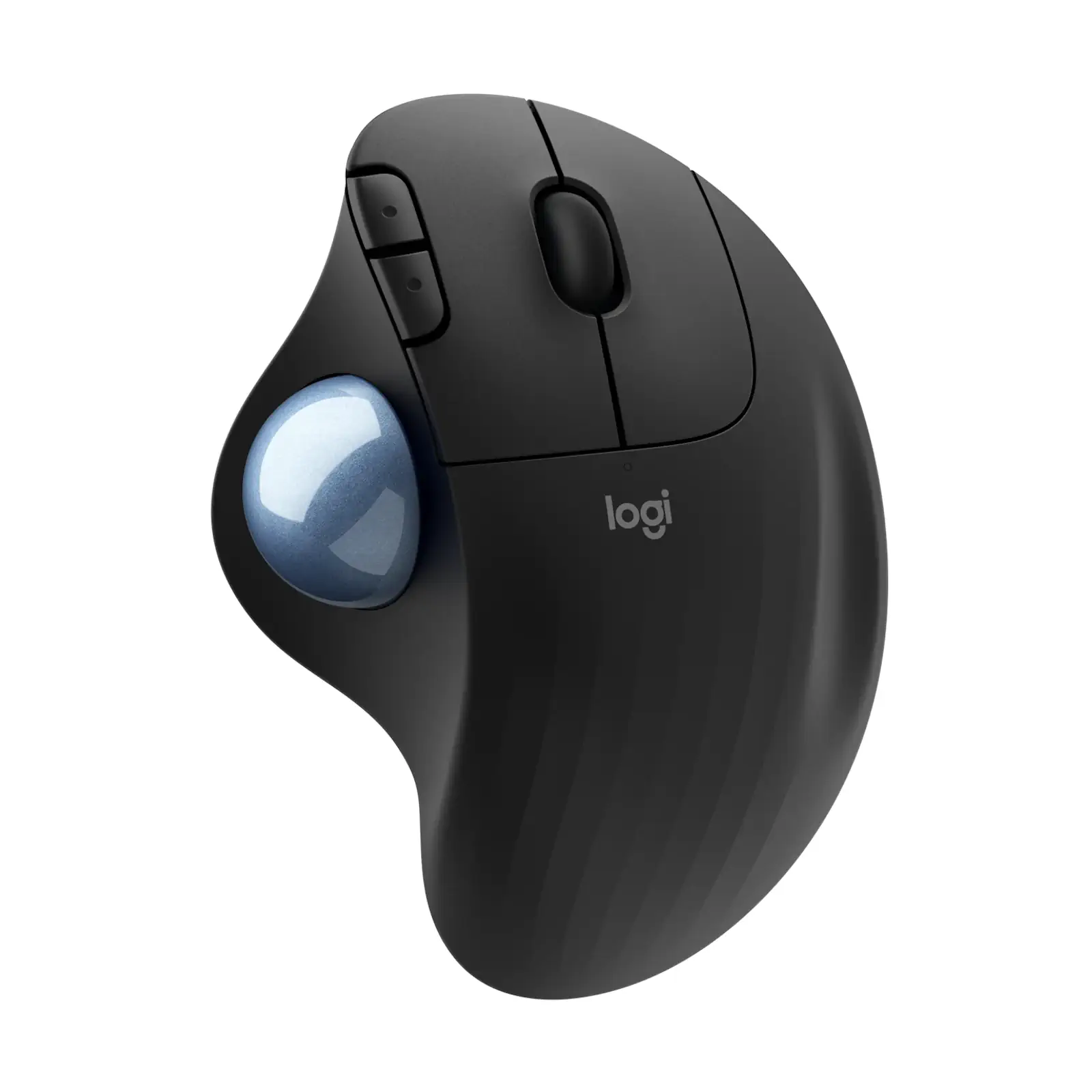
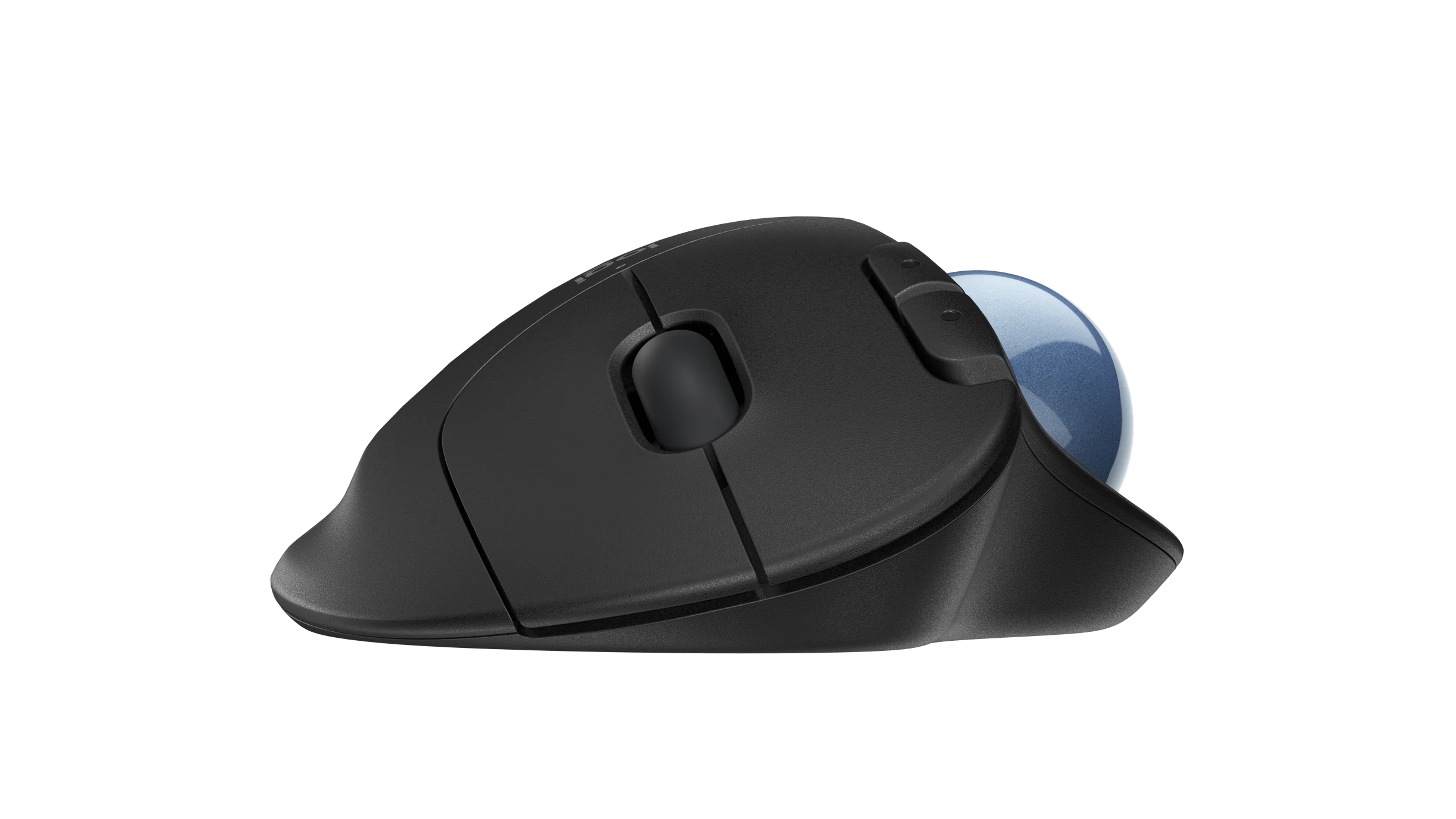
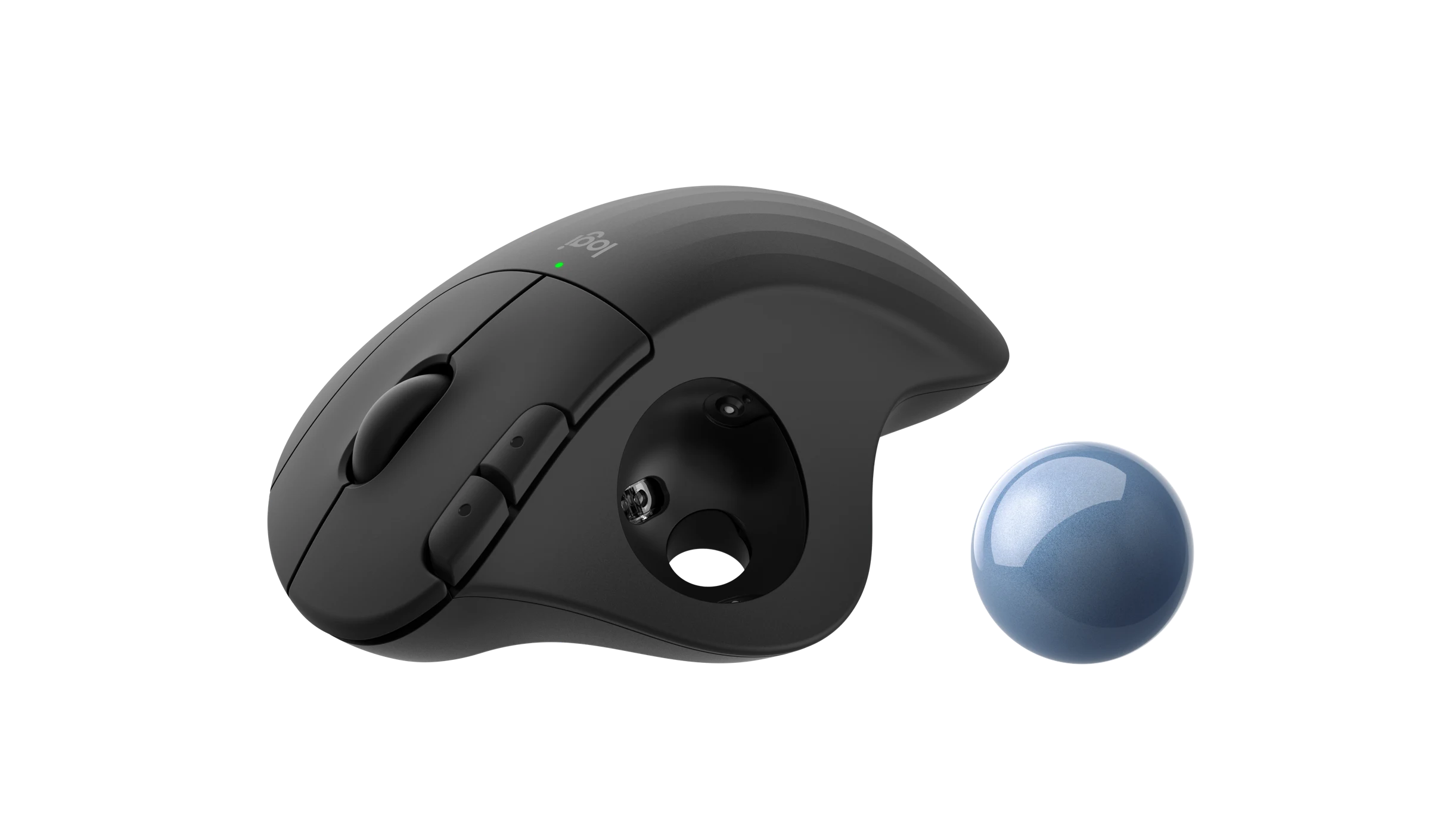
Revolutionize your workspace and reduce physical strain with the Logitech Ergo M575 Wireless Trackball. Designed for professionals, gamers, and anyone seeking ergonomic comfort, this trackball eliminates the need to move your arm entirely—simply glide your thumb across the smooth, coated ball for precise cursor control. Its sculpted, right-handed shape fits naturally in your hand, promoting a relaxed posture and reducing fatigue during long hours of use. With dual connectivity (Bluetooth and USB receiver), you can seamlessly switch between devices and enjoy a reliable connection from up to 10 meters away. The high-efficiency optical sensor ensures exceptional accuracy while maximizing battery life, offering up to 24 months of use on a single included AA battery. Its compact, stationary design is perfect for crowded desks, travel, or minimalist setups. For enhanced customization, use the Logi Options+ software to program buttons and adjust settings. Pair it with an ergonomic keyboard for a complete comfort-focused workspace.

Specifications

  • Brand: Logitech
  • Model: Ergo M575 (Graphite) 910-005873
  • Connectivity: Bluetooth Low Energy + USB Receiver (Unifying)
  • Battery Life: Up to 24 months (USB), 20 months (Bluetooth)
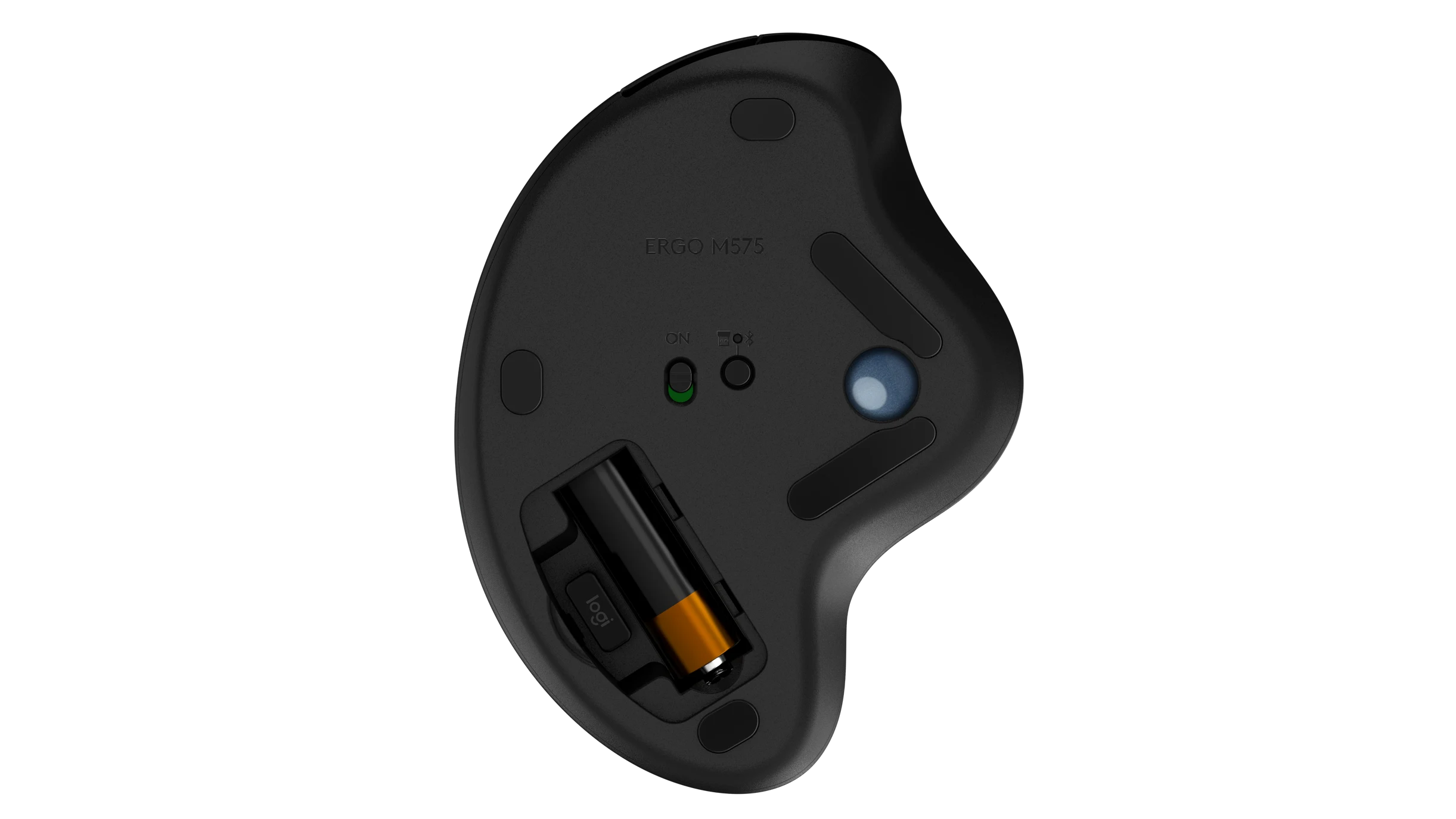
  • Battery Type: 1 x AA (included)
  • Sensor: Logitech Advanced Optical Tracking
  • DPI Range: 400–2000
  • Buttons: 5 programmable buttons (Left/Right, Back/Forward, scroll wheel with middle click)
  • Design: Right-handed ergonomic shape
  • Compatibility: Windows, macOS
  • Wireless Range: 10 m (33 ft)
  • Weight: 145 g

What’s in the Box

  • Logitech Ergo M575 Wireless Trackball
  • USB Unifying Receiver
  • 1 x AA Battery
  • User Documentation

FAQs

1. How does a trackball reduce arm strain?
Since the cursor is controlled by your thumb moving the ball, you don’t need to move your arm or wrist, significantly reducing muscle fatigue and strain.

2. Can I connect to multiple devices?
Yes, with dual connectivity (Bluetooth + USB receiver), you can switch between two devices—e.g., a laptop (via Bluetooth) and a desktop (via USB).

3. Is the trackball compatible with macOS?
Yes, it works seamlessly with macOS and Windows. For button customization, use Logi Options+ software.

4. How do I clean the trackball?
Gently remove the ball by turning the mouse over and pushing it out. Wipe the ball and internal sensors with a soft, dry cloth.

5. Can I adjust the cursor speed?
Yes, use Logi Options+ software to customize DPI (up to 2000) and tailor cursor speed to your preference.

6. Is the Logitech Ergo M575 wireless?
Yes, it operates wirelessly via Bluetooth or the included USB receiver, with a range of up to 10 meters.

7. How long does the battery last?
With the USB receiver: up to 24 months. With Bluetooth: up to 20 months. Actual life may vary based on usage.

8. Is this trackball right-handed or left-handed?
It is designed exclusively for right-handed users for optimal ergonomic comfort.

9. Does it work on uneven surfaces?
Yes! Since the mouse doesn’t need to be moved, it works perfectly on uneven surfaces, soft fabrics, or even your lap.

10. What is the warranty for this product?
Logitech provides a limited hardware warranty. Check warranty terms specific to your region upon purchase.

Specification

Discover ultimate workplace comfort and precision with the Logitech Ergo M575 trackball. Engineered around the focus keyword Logitech Ergo M575 trackball, this wireless device features intuitive thumb-controlled navigation, dual connectivity options, and an extended battery life of up to 24 months to completely transform your daily desk routine.

⚡ Features & Specs
Connector TypeUSB Receiver & Bluetooth Low Energy
Compatible DevicesPersonal Computers, Laptops, Mac, Windows Devices
Input Voltage1.5V (Standard AA Battery)
AmperageLow Power Consumption Profile
WattageNot Applicable (Battery Powered)
Output CurrentNot Applicable
Power Source1 x AA Battery
Current RatingStandard Low-Draw Operational Rating
Power PlugUSB Type-A Receiver
Connectivity TechnologyWireless (RF 2.4 GHz and Bluetooth)
Special FeaturesThumb-Controlled Trackball, Ergonomic Design, Dual Connectivity, Programmable Buttons, Space-Saving Stationary Footprint
MaterialDurable Polycarbonate and ABS Plastic with Coated Ball
ColorGraphite
Sensor TechnologyLogitech Advanced Optical Tracking
DPI Range400 to 2000 DPI (Adjustable via Software)
Number of Buttons5 Programmable Buttons
Scroll WheelYes, with Middle Click
Wireless Operating DistanceUp to 10 Meters (33 Feet)
Battery Life (USB Receiver)Up to 24 Months
Battery Life (Bluetooth)Up to 20 Months
Software SupportLogi Options+
Hand OrientationRight-Handed Exclusive
Surface AdaptabilityWorks on Uneven Surfaces, Fabric, and Laps
Tracking PrecisionSmooth Cursor Control Without Moving Base
Ergonomic BenefitReduces Wrist and Arm Strain
Plug and PlayYes
Unifying Receiver SupportYes
On/Off SwitchYes, Integrated Power Switch
Indicator LightBattery Status LED
Firmware UpgradeableYes, via Software
📋 Item details
BrandLogitech
Model NumberErgo M575
SKU910-005873
MFN Part Number910-005873
ManufacturerLogitech
CategoriesLogitech > Logitech Mouse
TagsLogitech Ergo M575 trackball
Country of OriginDesigned in Switzerland, Manufactured in Global Facilities
Item Model NumberM575
Product SeriesErgonomic Series
📏 Measurements
Number of Items1
Item Weight145 g
Unit Count1 Unit
Product DimensionsCompact Stationary Footprint
Package DimensionsStandard Retail Box Packaging
Trackball DiameterStandard Ergonomic Trackball Size
🎨 Additional details
ColorGraphite
Enclosure MaterialMatte Plastic Finish
Form FactorSculpted Right-Handed Ergonomic Shape
StyleModern Minimalist Desktop Accessory
ThemeErgonomic Productivity
Finish TypeSmooth Coated Ball with Textured Grip Areas
LED IndicatorSingle Status LED
Packaging TypeRetail Box
📖 User guide
Usage InstructionsControl the cursor using your thumb on the trackball while keeping the base stationary. Use side buttons for navigation.
InstallationPlug the USB receiver into an available USB port or pair via Bluetooth Low Energy in your computer settings.
Care InstructionsGently push the trackball out from the bottom to clean dust and debris from the internal sensors using a dry, soft cloth.
Safety WarningsAvoid exposure to liquids and extreme temperatures. Keep battery away from small children.
MaintenancePeriodically clean the trackball cavity and sensor area to maintain smooth tracking accuracy.
CertificationCE, FCC, RoHS Compliant
Compatibility NotesFull feature customization requires downloading Logi Options+ software on supported operating systems.
Operating Temperature0°C to 40°C
🎯 Use Cases
Best ForReducing wrist and arm strain during long hours of computer work
Ideal ScenariosTight desk spaces, cluttered workstations, travel setups, and uneven work surfaces
Target AudienceOffice professionals, remote workers, students, and users seeking ergonomic relief
Compatible WithWindows and macOS desktop environments
Not Recommended ForFast-paced competitive gaming requiring rapid physical arm sweeps
Workspace TypeMinimalist, multi-device setups
⚖️ Pros & Cons

Pros

  • Ergonomic design significantly reduces wrist and arm fatigue
  • Stationary footprint saves valuable desk space
  • Dual connectivity via Bluetooth and USB receiver
  • Extended battery life up to 24 months on a single AA battery
  • Works reliably on uneven surfaces and laps

Cons

  • Exclusively designed for right-handed users
  • Requires an adjustment period if you are transitioning from a standard mouse
  • Not optimized for fast-paced gaming genres
📦 Box Contents
Main UnitLogitech Ergo M575 Wireless Trackball
CablesNone (Fully Wireless Operation)
AdaptersUSB Unifying Receiver
DocumentationUser Documentation and Quick Start Guide
Warranty CardIncluded in Documentation Package
Other Accessories1 x AA Battery (Pre-installed or included separately)
🛡️ Warranty & Support
Warranty PeriodStandard Manufacturer Hardware Warranty
Warranty TypeLimited Hardware Warranty
CoverageDefects in materials and workmanship under normal use
Support ContactAvailable via Logitech Official Customer Support Portal
Return PolicySubject to retailer return guidelines upon purchase
Customer Service HoursStandard business hours via online support channels
Service LocationsAuthorized Logitech service centers globally
Reviews (1)
REAL CUSTOMER FEEDBACK

Customer Reviews

Ratings and experiences shared by customers.

5.0★★★★★1 reviews
5 ★
1
4 ★
0
3 ★
0
2 ★
0
1 ★
0
F
Fahad✓ Verified purchase2 July 2026
★★★★★

Share your experience

Rate this product and help other customers make an informed choice.

Write a review

Please complete all the fields below to tell us about your experience with this product.

Your rating *
Select 1 to 5 stars


FAQs
PRODUCT SUPPORT

Frequently Asked Questions

11 answers
01What is the maximum DPI supported by the Logitech Ergo M575?

The Logitech Ergo M575 trackball features Logitech Advanced Optical Tracking with a DPI range from 400 up to 2000, allowing smooth and accurate cursor control.

02How many programmable buttons does the Ergo M575 include?

This trackball features five programmable buttons, which include left and right clicks, back and forward buttons, and a scroll wheel with a middle click.

03What wireless range can I expect from the USB receiver or Bluetooth?

The Logitech Ergo M575 provides a reliable wireless range of up to 10 meters, giving you flexible placement options for your workspace setup.

04What type of battery powers the Logitech Ergo M575 trackball?

It is powered by a single AA battery, which is included in the box. The device features ultra-low power consumption for extended use.

05What is the weight of the Logitech Ergo M575 Graphite trackball?

The Logitech Ergo M575 wireless trackball weighs 145 grams, contributing to its stable, stationary footprint on your desk.

06Can I use Logi Options+ software to customize the trackball settings?

Yes, you can use the Logi Options+ software to program buttons, adjust settings, and tailor the device to your workflow preferences.

07Does the trackball require desk space for physical movement?

No, it features a compact, stationary footprint with a thumb-controlled trackball, meaning you do not need to move the base, making it ideal for tight desks.

08Which operating systems are compatible with the Ergo M575?

The Logitech Ergo M575 is officially compatible with Windows and macOS operating systems, supporting seamless connection via Bluetooth Low Energy or the USB receiver.

09What items are included inside the product box?

The box contains the Logitech Ergo M575 Wireless Trackball, a USB Unifying Receiver, one AA battery, and user documentation.

10How does thumb control help reduce physical strain during long hours?

The thumb-controlled trackball minimizes arm movement entirely by allowing you to glide your thumb across the smooth ball for cursor control, reducing wrist and arm fatigue.

11Where can I buy Logitech Ergo M575 Wireless Trackball (Graphite) Thumb Controlled, Bluetooth & USB Receiver, 24-M... (SKU: 910-005873) and what is its price?
You can purchase Logitech Ergo M575 Wireless Trackball (Graphite) Thumb Controlled, Bluetooth & USB Receiver, 24-M... (SKU: 910-005873) directly from UGREEN PK. Price is ₨ 16,500.00. Visit the product page here: UGREEN PK

Compare Products

⚖At a glanceEvery detail that matters, in one place.
Logitech 910-005873 Ergo M575 Wireless Trackball Graphite CURRENT PRODUCT Logitech Ergo M575 Wireless Trackball (Graphite) Thumb Controlled, Bluetooth & USB Receiver, 24-Month Battery Explore product Logitech 910-007190 Signature M550 Wireless Mouse Graphite SIMILAR PRODUCT Logitech Signature M550 Wireless Mouse (Graphite) SmartWheel Scrolling, 4000 DPI Bluetooth & Logi Bolt, 24-Month Battery Explore product Logitech 910-004655 M171 Wireless Mouse Grey SIMILAR PRODUCT Logitech M171 Wireless Mouse, 1000 DPI 12-Month Battery Life 2.4GHz USB Mini Receiver Explore product Logitech 910-004658 M170 Wireless Mouse SIMILAR PRODUCT Logitech M170 Wireless Mouse 12-Month Battery 2.4GHz USB Nano Receiver 1000 DPI Plug & Play Explore product Buy Logitech M196 Wireless Bluetooth Mouse 12-Month Battery Online in Pakistan - UGREEN PK SIMILAR PRODUCT Logitech M196 Wireless Bluetooth Mouse 12-Month Battery Explore product Buy Logitech M196 Wireless Bluetooth Mouse 12-Month Battery Online in Pakistan - UGREEN PK SIMILAR PRODUCT Logitech M196 Wireless Bluetooth Mouse 12-Month Battery Explore product
Price ₨ 16,500.00₨ 11,500.00₨ 4,600.00₨ 4,500.00₨ 5,500.00₨ 5,500.00
Customer Rating 5.0 (1)No ratings yetNo ratings yetNo ratings yetNo ratings yetNo ratings yet
Availability

Available in stock

Available in stock

Available in stock

Available in stock

Available in stock

Available in stock

SKU 910-005873910-007190910-004655-56-57910-004658910-007463910-007462
Connectivity Technology Wireless (RF 2.4 GHz and Bluetooth)Wireless (Bluetooth Low Energy + Logi Bolt USB Receiver)2.4 GHz Wireless2.4 GHz WirelessWireless BluetoothBluetooth
Sensor Type ——OpticalOptical TrackingOptical SensorOptical Sensor
Item Weight 145 gStandard Lightweight Design69.3g (with battery) / 70.5g gross70.5 g (with battery)76g (with battery)76g (with battery)
Number of Buttons 5 Programmable Buttons3 (Left/Right Click, Middle Click with SmartWheel)3 (Left, Right, Clickable Scroll Wheel)3 (Left, Right, Clickable Scroll Wheel)3 (Left Click, Right Click, Middle Click via Scroll Wheel)—
DPI Range 400 to 2000 DPI (Adjustable via Software)400 – 4000 (adjustable via Logi Options+)————
Battery Type —1 x AA Battery (included)—1 x AA (Included)——
Input Voltage 1.5V (Standard AA Battery)1.5V (AA Battery)1.5V (AA Battery)1.5V (AA Battery)1.5V (1 x AA Battery)1.5V