
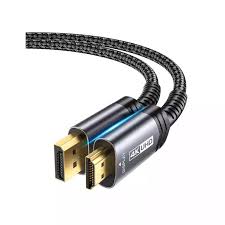
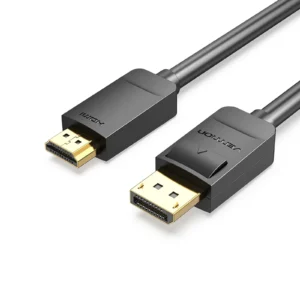
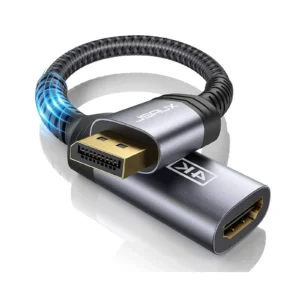
JSAUX 4K DisplayPort to HDMI Cable 2m | Uni-Directional Converter | Plug & Play | for PC, Laptop, GPU to Monitor/TV
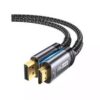
Connect your modern computer to a high-definition display with ease using the JSAUX 4K DisplayPort to HDMI Cable. This all-in-one solution is perfect for extending your desktop or mirroring your screen to a monitor, projector, or HDTV. It delivers a crisp, clear picture with support for 4K resolution, bringing your movies, games, and work to life with vibrant detail. The true plug-and-play design means there’s no frustrating software installation or complicated setup—just connect your devices and you’re ready to go. It is specifically engineered to convert a DisplayPort output to an HDMI input, making it ideal for connecting a desktop with a dedicated graphics card or a business laptop to a larger screen. This reliable cable is HDCP 2.2 compliant, ensuring you can enjoy streaming your favorite 4K content without any issues. It’s the simple, high-performance cable you need for your home office, gaming setup, or presentation room.
Specifications
- Brand & Model: JSAUX CV0047 DisplayPort to HDMI Cable
- Connection: DisplayPort (Male) to HDMI (Male)
- Max Resolution: 4K Ultra HD
- Key Feature: Plug and Play (No Drivers), HDCP 2.2 Compliant
- Direction: Uni-Directional (DisplayPort Source to HDMI Display)
- Cable Length: 2 Meters
- Compatibility: Laptops, Desktops, GPUs (AMD, NVIDIA) with DisplayPort
What’s in the Box
- JSAUX 4K DisplayPort to HDMI Cable (2m)
FAQs
1. Can I use this cable to connect my HDMI laptop to a DisplayPort monitor?
No, this is a uni-directional cable that only works from a DisplayPort source to an HDMI display. It will not work in reverse.
2. Is this cable suitable for gaming?
Yes, it supports 4K resolution, making it suitable for gaming. However, for high-refresh-rate gaming (e.g., 144Hz), ensure your source and display support it over this connection, as it is optimized for standard 4K at 60Hz.
3. Do I need to install any drivers for it to work?
No, this is a true plug-and-play device. Your computer and display should automatically recognize each other once the cable is connected.
4. Will it work with my specific HP/Lenovo/Dell laptop?
It is universally compatible with any device that has a standard DisplayPort or DisplayPort++ output. This includes most business and gaming laptops from major brands like HP, Dell, and Lenovo.
5. Does it support audio as well as video?
Yes, this cable carries both high-definition video and audio from the DisplayPort source to your HDMI display, so you can get sound through your TV or monitor’s speakers.
6. What is HDCP 2.2 and why is it important?
HDCP (High-bandwidth Digital Content Protection) 2.2 is a copyright protection standard required to play 4K content from streaming services like Netflix, Amazon Prime, and Disney+. This cable is compliant, so you won’t encounter blocking or error messages.
7. What is the maximum resolution and refresh rate?
The cable is designed to support 4K resolution. For specific refresh rates like 60Hz at 4K, it depends on the capabilities of your source device and display, but it is built to handle standard 4K@60Hz signals.
8. Is there a difference between this and a regular HDMI cable?
Yes, this cable has an active chipset that converts the DisplayPort signal to an HDMI signal. A standard HDMI cable on its own cannot connect to a DisplayPort port.
9. Will it work with my PlayStation or Xbox?
No, game consoles have HDMI outputs. This cable is for devices with a DisplayPort output. You would need a standard HDMI cable for your console.
10. Is the 2-meter length sufficient for most setups?
A 2-meter cable provides a good balance, offering enough reach for most desk setups where your computer is near your monitor or TV, while avoiding excessive cable clutter

 No products in the cart.
Ishfaq Hussain (verified owner) –