


UGREEN 90813 HDMI to VGA Adapter Converter, Connect HDMI Devices to VGA Displays
The UGREEN 90813 HDMI to VGA Adapter Converter provides a practical solution for connecting modern HDMI-enabled devices to older monitors, projectors and other display equipment with a VGA input.
Many laptops and desktop computers feature HDMI output ports, while some office monitors, classroom projectors and presentation systems continue to use VGA connections.
This adapter bridges the connection between these two interfaces, allowing compatible HDMI video sources to display content on VGA equipment without replacing an existing monitor or projector.
With Full HD 1080P resolution support, an additional USB-C power input and durable construction, the UGREEN 90813 is suitable for everyday display connectivity.
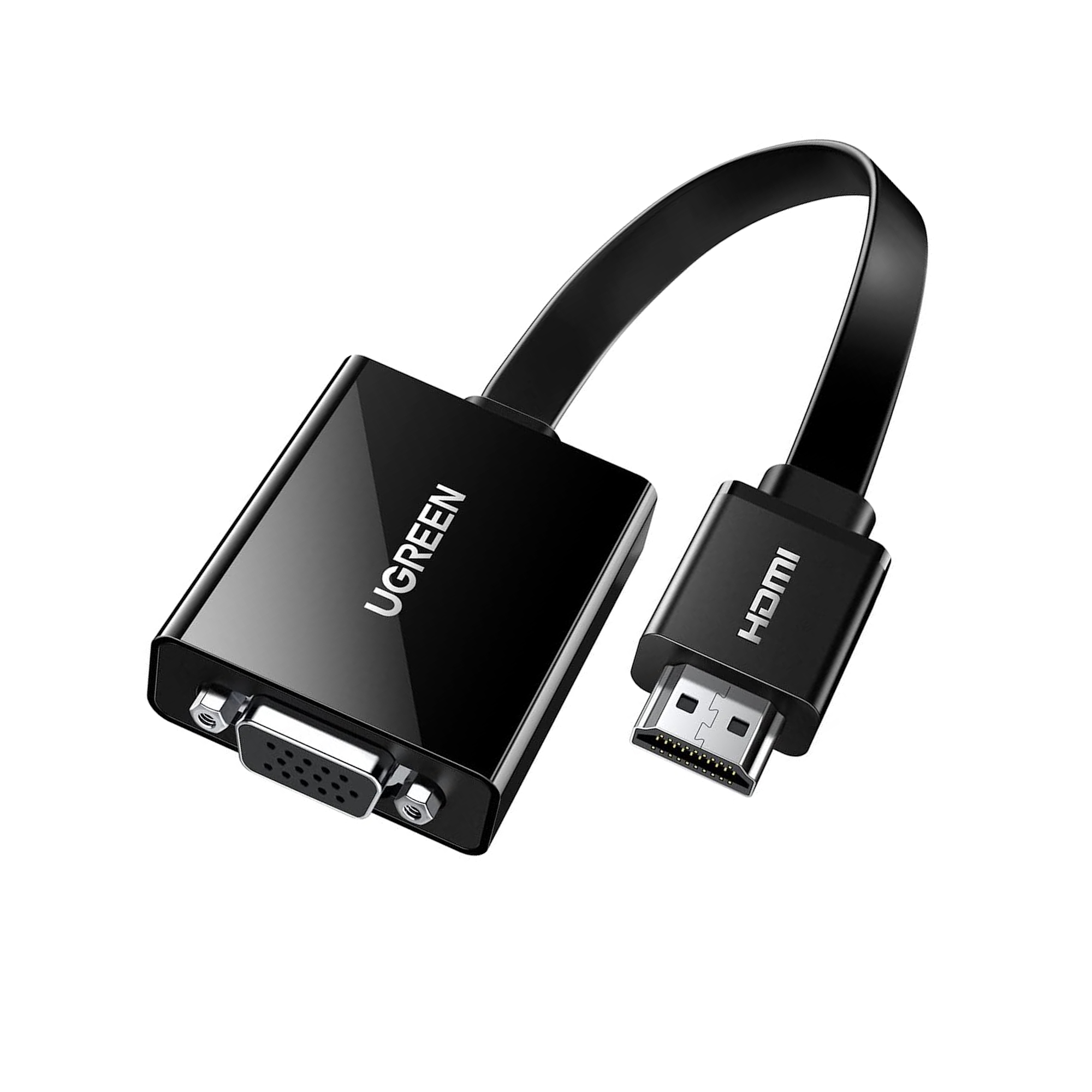
HDMI Male Input to VGA Female Output
The adapter features an HDMI male connector on the input side and a VGA female port on the output side.
It is designed to convert a compatible digital HDMI video signal into an analog VGA video signal.
Typical connection arrangements include:
- HDMI laptop to VGA monitor
- HDMI desktop PC to VGA projector
- HDMI computer to older VGA display
- HDMI-enabled presentation device to VGA projector
- Compatible HDMI source to VGA display equipment
The HDMI male connector plugs into the source device, while a separate VGA cable connects the adapter’s VGA female output to the display.
Important: This is a one-way HDMI-to-VGA converter. It does not convert VGA output into HDMI input.
Full HD 1920 × 1080 at 60Hz Resolution
The UGREEN 90813 supports video output up to 1920 × 1080 at 60Hz.
This makes it suitable for common Full HD display applications, including:
- Office documents and spreadsheets
- PowerPoint presentations
- Educational content
- Video playback
- Web browsing
- General desktop computing
The supported resolution allows compatible displays to present clear text, detailed graphics and smooth everyday video.
Actual output resolution depends on the capabilities of the HDMI source, VGA cable and connected display.
Additional USB-C Power Supply Port
The adapter includes a USB-C port for supplementary power.
Some HDMI source devices may not provide sufficient power through their HDMI output for reliable converter operation.
In such situations, the USB-C power input allows an additional compatible power source to be connected.
This can be useful when working with certain laptops, desktop systems or other HDMI-enabled devices.
The USB-C port is intended for supplementary power to the converter. It is not a USB-C video input, data port or laptop charging output.
The supplied product information does not specify the required power rating or confirm that a USB-C power cable is included.
Tinned Copper Wire Core
The UGREEN 90813 features a tinned copper wire core.
Tinned copper conductors are used in electrical cable construction because they provide conductive pathways while offering resistance to conductor oxidation.
This construction supports the adapter’s internal electrical connections and everyday durability.
Overall signal performance also depends on the connected devices and VGA cable quality.
Durable ABS Case and Protective Jacket
The adapter features an ABS housing designed to protect its internal components.
ABS is commonly used in electronic accessory enclosures because it provides a practical combination of rigidity and impact resistance.
The cable also features an environmental jacket as described in the supplied product information.
Together, these construction elements make the adapter suitable for regular handling, transportation and everyday computer connectivity.
The exact jacket material and any environmental certification have not been specified.
Connect a Laptop to a VGA Projector
The UGREEN 90813 is particularly useful for presentations in classrooms, meeting rooms and offices where a VGA projector is still in use.
To establish a connection:
- Connect the adapter’s HDMI male plug to the laptop’s HDMI output.
- Connect a compatible VGA cable to the adapter’s VGA female port.
- Connect the other end of the VGA cable to the projector.
- Connect supplementary USB-C power if required.
- Select the appropriate VGA input on the projector.
- Configure the laptop’s display settings for duplicate or extended display mode.
This allows compatible laptops to display presentations and other visual content through a VGA projector.
Use an Existing VGA Monitor with an HDMI Computer
The adapter can also help extend the usefulness of older VGA monitors.
If your desktop computer or laptop has an HDMI output but the monitor only supports VGA input, the UGREEN 90813 provides the required video signal conversion.
Depending on your computer and operating system, the external display may be configured for:
- Screen duplication
- Extended desktop
- External-display-only operation
These modes are controlled by the computer’s graphics hardware and operating system.
Practical Applications
Office Presentations
Connect compatible HDMI laptops to existing VGA projectors in meeting rooms and conference facilities.
Educational Institutions
Use HDMI-enabled computers with VGA classroom projectors and display systems.
Home Workstations
Connect a modern laptop or desktop computer to an older VGA monitor.
Business Environments
Maintain compatibility with legacy VGA displays without immediately replacing working equipment.
Computer Maintenance
Use a VGA monitor with a compatible HDMI-equipped computer during supported setup and troubleshooting tasks.
Buy UGREEN 90813 HDMI to VGA Adapter in Pakistan
Order the UGREEN 90813 HDMI to VGA Adapter Converter from UTECH.PK for your compatible laptop, desktop computer, monitor or projector. Shop online with cash on delivery and nationwide delivery options across Pakistan, including Karachi, Lahore, Islamabad, Rawalpindi, Faisalabad and Multan.
3. Product Specifications
General Information
- Brand: UGREEN
- Product Name: HDMI to VGA Adapter Converter
- Model / SKU: 90813
- Product Type: HDMI to VGA Video Converter
- Conversion Direction: HDMI Input to VGA Output
- Signal Conversion: Digital HDMI Video to Analog VGA Video
- Primary Application: Connecting HDMI source devices to VGA displays
Input and Output Specifications
- Input Connector: HDMI Male
- Output Connector: VGA Female
- Additional Interface: USB-C Power Input
- Maximum Supported Resolution: 1920 × 1080
- Maximum Specified Refresh Rate: 60Hz at 1920 × 1080
- Video Standard: Full HD 1080P
- Connection Direction: Unidirectional, HDMI to VGA
- VGA Cable: Separate compatible VGA cable required for connecting to a VGA display
Construction Specifications
- Wire Core: Tinned Copper
- Housing Material: ABS
- Cable Jacket: Environmental Jacket
- Connector Plating: Not specified
- Cable Length: Not specified
- Product Dimensions: Not specified
- Product Weight: Not specified
- Product Color: Not specified in supplied information
Power Specifications
- Supplementary Power Interface: USB-C
- USB-C Port Function: Additional converter power supply
- Required USB-C Input Voltage: Not specified
- Required USB-C Input Current: Not specified
- USB-C Data Transfer: Not specified; port is described for power supply
- USB-C Video Input: Not supported by the described configuration
- Laptop Charging Output: Not supported by the described configuration
Device Compatibility
- Laptops: Models with compatible HDMI output
- Desktop Computers: Models with compatible HDMI output
- Monitors: Models with VGA input
- Projectors: Models with VGA input
- Presentation Displays: Compatible VGA display equipment
- Gaming Consoles: Model-specific compatibility not confirmed
- TV Boxes and Media Players: Model-specific compatibility not confirmed
Product Identification
- Manufacturer / Brand: UGREEN
- SKU: 90813
- Category: HDMI to VGA Adapters
- Barcode: Not provided
- Warranty: Not specified in supplied product information
4. Important Compatibility and Usage Notes
- The UGREEN 90813 converts HDMI video output to VGA video input only.
- It cannot convert a VGA source signal into an HDMI display signal.
- The source device must provide a compatible HDMI video output.
- The display must have a compatible VGA input.
- A separate VGA cable is required to connect the adapter’s VGA female port to a monitor or projector.
- The maximum specified video resolution is 1920 × 1080 at 60Hz.
- VGA carries video rather than digital HDMI audio. This adapter should not be assumed to provide audio output.
- The USB-C port is intended for supplementary power and does not function as a USB-C video input.
- Additional USB-C power may be needed for certain HDMI source devices.
- The required supplementary power rating is not specified in the supplied information.
- Display quality depends on the source device, VGA cable and monitor or projector.
- Protected HDMI content may be subject to compatibility restrictions because VGA is an analog interface.
- Support for specialized refresh rates, gaming features and resolutions beyond Full HD 1080P is not confirmed.
- This adapter does not add an HDMI output to a device that lacks one.
5. Frequently Asked Questions (FAQs)
Q1. What is the UGREEN 90813 HDMI to VGA adapter used for?
It converts a compatible HDMI video output into a VGA video signal, allowing an HDMI-equipped computer or other supported source to connect to a VGA monitor or projector.
Q2. Does the UGREEN 90813 support Full HD 1080P?
Yes. It supports video resolution up to 1920 × 1080 at 60Hz, according to the supplied product specifications.
Q3. Can I connect my HDMI laptop to a VGA projector?
Yes. Connect the adapter to the laptop’s HDMI output and use a compatible VGA cable to connect the adapter to the projector.
Q4. Can this adapter convert VGA to HDMI?
No. The UGREEN 90813 is a one-way HDMI-to-VGA converter. It cannot be used to connect a VGA computer output to an HDMI monitor.
Q5. What is the USB-C port used for?
The USB-C port provides supplementary power to the converter when additional power is needed for stable operation.
Q6. Does the USB-C port support video or data transfer?
The supplied product information identifies it as a power supply port. USB-C video input and data transfer functionality are not specified.
Q7. Does the HDMI to VGA adapter support audio?
VGA is a video interface and does not carry HDMI audio. No separate audio output is specified for this adapter.
Q8. Do I need a separate VGA cable?
Yes. Because the adapter has a VGA female output, a compatible VGA cable is needed to connect it to a monitor or projector.
Q9. Can I use this adapter with an older VGA monitor?
Yes, provided the monitor supports a compatible VGA input signal and the source device provides HDMI video output.
Q10. Does the adapter require software installation?
For standard compatible HDMI-to-VGA connections, a separate application is generally unnecessary. The computer may still require normal graphics drivers and appropriate display settings.








 No products in the cart.

Write a review