Product Specifications for Logitech MX Keys S Wireless Illuminated Keyboard & Mouse Combo
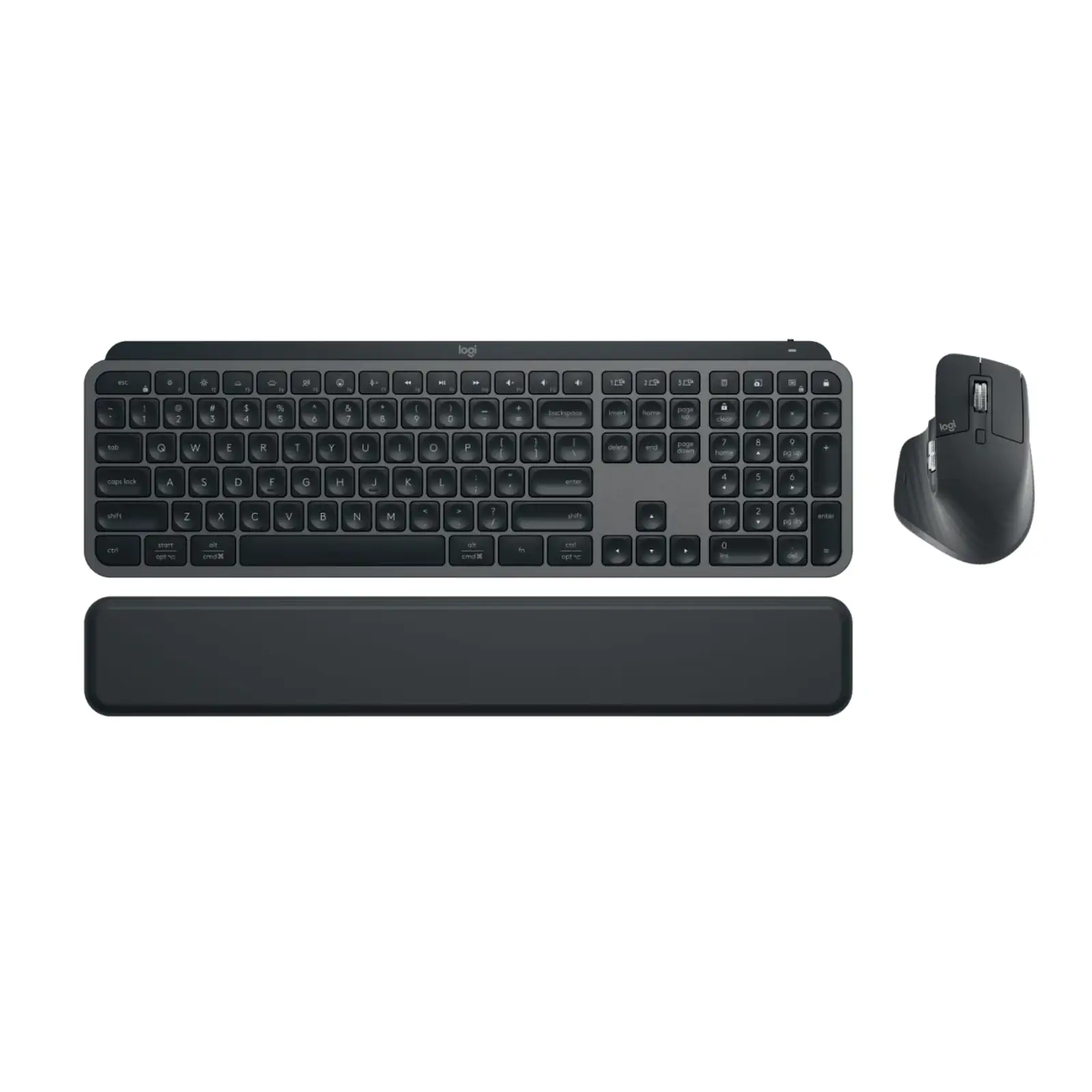
Product Overview: Enhance your daily productivity with the Logitech MX Keys S Wireless Illuminated Keyboard & Mouse Combo. As an ultimate productivity bundle engineered by Logitech, this setup features smart illumination, whisper-quiet typing, and 8K DPI Darkfield tracking that operates smoothly on any surface including glass. Experience seamless multi-device control across up to three computers using this premium logitech wireless keyboard and mouse combination.
Features & Specs - Connectivity Technology: Wireless (Bluetooth Low Energy & Logi Bolt USB Receiver)
Features & Specs - Compatible Devices: Windows, macOS, Linux, iPadOS, iOS, Android
Features & Specs - Power Source: Rechargeable Lithium-Ion Battery (USB-C)
Features & Specs - Keyboard Battery Life: Up to 10 days on a full charge (or up to 5 months with backlighting turned off)
Features & Specs - Mouse Battery Life: Up to 70 days on a full charge
Features & Specs - Sensor Technology: Darkfield high precision mouse sensor
Features & Specs - Nominal DPI: 1000 DPI (adjustable in increments of 50 DPI)
Features & Specs - Max DPI: Up to 8000 DPI
Features & Specs - Number of Mouse Buttons: 7 customizable buttons (Left/Right-click, Back/Forward, App-switch, Wheel mode-shift, Middle click)
Features & Specs - Scroll Wheel: MagSpeed electromagnetic scrolling wheel with automatic shift from line-by-line to free spin
Features & Specs - Thumb Wheel: Yes
Features & Specs - Gesture Button: Yes
Features & Specs - Keyboard Backlighting: Smart illumination with ambient light sensor and hand proximity sensor
Features & Specs - Key Switch Type: Low-profile scissor-switch keys
Features & Specs - Special Features: Quiet clicks (90% noise reduction), Flow cross-computer control, Easy-switch between up to 3 devices
Features & Specs - Wireless Operating Distance: Up to 10 meters (33 feet)
Features & Specs - Charging Port: USB Type-C
Features & Specs - Indicator Lights: Caps Lock and Battery status indicator lights
Features & Specs - Sustainability Features: Made with post-consumer recycled plastic (26-27%), low-carbon aluminum
Features & Specs - Software Support: Logi Options+ app for custom button and key configurations
Features & Specs - Input Voltage: 5V, 1A (Charging)
Features & Specs - Current Rating: Rechargeable via standard USB-C interface
Features & Specs - Material: Recycled ABS plastic, Aluminum
Features & Specs - Color: Graphite
Features & Specs - Operating System Requirements (Logi Options+): Windows 10, 11 or later; macOS 11 or later
Features & Specs - Operating System Requirements (Bluetooth): Windows 10, 11 or later; macOS 11 or later; Linux; ChromeOS; iPadOS 14 or later; iOS 14 or later; Android 9.0 or later
Features & Specs - Logi Bolt Receiver Requirements: Available USB Port, Windows 10, 11 or later; macOS 11 or later; Linux; ChromeOS
Features & Specs - Encryption: Wireless encryption details standard to Logi Bolt technology
Features & Specs - Design Type: Ergonomic desktop productivity combo
Features & Specs - Plug and Play: Yes, via Logi Bolt USB Receiver
Item details - Brand: Logitech
Item details - Product Name: Logitech MX Keys S Wireless Illuminated Keyboard & Mouse Combo
Item details - Model Number: MX Keys S + MX Master 3S Combo
Item details - SKU: 920-011605
Item details - Manufacturer: Logitech
Item details - Categories: Logitech
Item details - Tags: logitech wireless keyboard
Item details - Country of Origin: Designed in Switzerland, Manufactured in global facilities
Item details - Item Model Number: 920-011605
Measurements - Number of Items: 1 Combo Set (Keyboard and Mouse)
Measurements - Keyboard Dimensions: Standard full-size with numeric keypad
Measurements - Mouse Dimensions: Ergonomic sculpted contour design
Measurements - Palm Rest Dimensions: Detachable ergonomic palm rest included
Measurements - Package Dimensions: Standard retail packaging bundle dimensions
Measurements - Item Weight: Standard combined desktop weight profile
Measurements - Unit Count: 1 Combo Pack
Additional details - Color: Graphite
Additional details - Enclosure Material: Durable plastic and metal framing
Additional details - Form Factor: Full-size keyboard layout with sculpted ergonomic mouse
Additional details - Style: Modern, minimalist, professional desktop setup
Additional details - Theme: Productivity and Creative Workstation
Additional details - Finish Type: Matte textured finish
Additional details - Hand Orientation (Mouse): Right-handed
Additional details - Keyboard Profile: Ultra-thin low profile
User guide - Usage Instructions: Connect via Bluetooth or plug in the Logi Bolt USB receiver. Install Logi Options+ software to configure custom shortcuts and activate Logitech Flow cross-computer control.
User guide - Installation: Plug-and-play setup for basic input; software installation recommended for advanced customization features.
User guide - Care Instructions: Clean surfaces gently using a soft, lint-free cloth. Avoid liquid cleaners directly on electronic components.
User guide - Safety Warnings: Do not expose the internal lithium-ion battery to extreme heat, open flame, or puncture the casing.
User guide - Maintenance: Recharge batteries periodically using the provided USB-C charging cables when battery level indicators alert low power.
User guide - Certification: Carbon-neutral certified, FSC-certified packaging
User guide - Compatibility Notes: Full feature set requires Logi Options+ application running on Windows or macOS. Basic functions operate natively on Linux, iPadOS, and Android.
User guide - Operating Temperature: 0°C to 40°C recommended environment
Use Cases - Best For: Intensive typing, coding, digital content creation, multi-device workflow management, and office productivity.
Use Cases - Ideal Scenarios: Multi-monitor setups, switching workflow between a laptop and desktop computer simultaneously, quiet office environments.
Use Cases - Target Audience: Professionals, software developers, writers, video editors, designers, and corporate remote workers.
Use Cases - Compatible With: Windows desktop PCs, Apple MacBooks, iMacs, iPads, Linux workstations, and Android tablets.
Use Cases - Not Recommended For: Hardcore competitive gaming requiring ultra-low latency mechanical switches and specialized gaming polling rates.
Pros & Cons - Pros: Exceptional typing comfort with tactile, perfectly-stroked low profile keys.
Pros & Cons - Pros: Ultra-precise 8K DPI Darkfield mouse sensor tracks effortlessly on glass surfaces.
Pros & Cons - Pros: Seamless cross-computer file transfer and control via Logitech Flow technology.
Pros & Cons - Pros: Smart backlighting features auto-brightness adjustment and proximity sensors to save battery.
Pros & Cons - Pros: Quiet click mouse reduces operational noise by 90% for distraction-free work.
Pros & Cons - Pros: Dual connectivity supporting both Bluetooth Low Energy and secure Logi Bolt USB receivers.
Pros & Cons - Cons: Advanced customization software (Logi Options+) is limited to Windows and macOS operating systems.
Pros & Cons - Cons: Right-handed ergonomic mouse design is not optimized for left-handed users.
Pros & Cons - Cons: Keyboard legs do not offer adjustable tilt angles beyond the fixed ergonomic inclination.
Box Contents - Main Unit: MX Keys S Wireless Keyboard & MX Master 3S Wireless Mouse
Box Contents - Cables: USB-C Charging Cable (USB-A to USB-C)
Box Contents - Adapters: Logi Bolt USB Receiver
Box Contents - Documentation: User Documentation and Quick Start Guide
Box Contents - Other Accessories: Detachable Ergonomic Palm Rest
Warranty & Support - Warranty Period: 1-Year Limited Hardware Warranty
Warranty & Support - Warranty Type: Manufacturer Hardware Replacement/Repair Warranty
Warranty & Support - Coverage: Covers manufacturing defects in materials and workmanship under normal use conditions
Warranty & Support - Support Contact: Accessible via Logitech Official Customer Support Portal
Warranty & Support - Return Policy: Subject to standard merchant purchase terms and store policy guidelines
Warranty & Support - Customer Service Hours: Available online 24/7 via Logitech support channels
Warranty & Support - Service Locations: Authorized service centers globally




 No products in the cart.

Write a review