


Logitech R500 Wireless Presentation Remote with Red Laser | 20m Range | Dual Bluetooth & USB Connectivity | App Customization | for PowerPoint, Google Slides – Mac & Windows
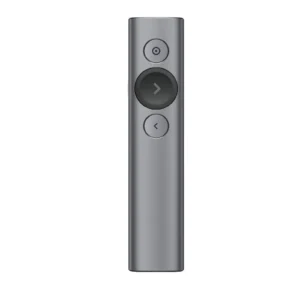
Command every presentation with professional flair and effortless control. The Logitech R500 Wireless Presentation Remote is engineered for presenters who demand reliability and advanced features. Choose your connection method: seamlessly pair via Bluetooth to save a USB port or use the plug-and-play USB receiver for universal compatibility. The generous 20-meter wireless range allows you to move throughout the room, while the bright red laser pointer ensures your audience focuses exactly where you want them to. Unlock the full potential of the R500 with the Logitech Presentation App, allowing you to customize buttons, track battery percentage, and display a discreet on-screen timer. Its thoughtfully designed ergonomic shape with a soft-touch grip provides ultimate comfort and control, eliminating fumbles and distractions. With industry-leading battery life, the R500 is the intelligent, dependable partner for executives, educators, and professionals.
Key Features:
- Dual Connectivity Options: Bluetooth Low Energy or 2.4GHz USB receiver for ultimate flexibility.
- Long 20m Operating Range: Reliable performance from anywhere in the room.
- Customizable Buttons via App: Remap functions and access advanced features like a timer.
- 12-Month Plus Battery Life: Runs for over a year on a single AAA battery (laser not in use).
- Ergonomic & Secure Grip: Soft rubber finish and contoured design for a confident hold.
- Prevents Sleep Mode: The companion app keeps your computer awake during presentations.
- Wide Software Compatibility: Works with PowerPoint, Google Slides, Keynote, and more.
- Cross-Platform Support: Compatible with Windows, macOS, Chrome OS, iOS, and Android.
Specifications:
- Brand: Logitech
- Model: R500 (910-005388)
- Connectivity: Dual: Bluetooth Low Energy & 2.4 GHz USB Receiver
- Wireless Range: Up to 20 meters (65 feet)
- Laser: Red Laser Pointer (Class 2, <1mW)
- Battery: 1 x AAA (included)
- Battery Life: 12+ months (without laser use)
- Compatibility:
- Via USB Receiver: Windows 7+, macOS 10.12+, Chrome OS, Linux 2.6+
- Via Bluetooth: Windows 8+, macOS 10.12+, iOS 8+, Android 5.0+
- Dimensions: 123.6 x 36.6 x 24.7 mm
- Weight: 53.5g (including battery)
- Required: Internet connection for app download
What’s in the Box:
- 1x Logitech R500 Presenter
- 1x USB Receiver
- 1x AAA Battery
- 1x User Documentation
FAQs:
1. What is the difference between the R400 and the R500?
The R500 offers significant upgrades, including dual Bluetooth/USB connectivity, a much longer 20m range, a companion app for customization and timer, an ergonomic grip design, and vastly superior battery life (12+ months vs. 20 hours).
2. How do I connect the R500 to my computer?
You have two options: 1) Insert the included USB receiver for instant plug-and-play operation. 2) Pair it via Bluetooth through your computer’s settings menu for a dongle-free connection.
3. Is it compatible with my MacBook Pro?
Yes, the R500 is fully compatible with macOS 10.12 or later via both the USB receiver and Bluetooth connection.
4. Can I use it with my iPad or Android tablet?
Yes, if your tablet supports Bluetooth peripherals and runs iOS 8+ or Android 5.0+, you can pair the R500 via Bluetooth to control presentation apps on your mobile device.
5. What can I customize in the Logitech Presentation App?
The app allows you to remap the button functions, check the precise battery level, set an on-screen timer, and it automatically prevents your computer from going to sleep during your talk.
6. How long does the battery actually last?
The battery is rated to last for over 12 months of regular presentation use (using the advance/retreat buttons). Frequent use of the laser pointer will reduce this duration.
7. Does it work with Google Slides?
Absolutely. It works with any presentation software that recognizes keyboard arrow keys, including Google Slides, PowerPoint, Keynote, Prezi, and others.
8. Is the USB receiver stored inside the presenter?
Yes, the compact USB receiver stores securely inside the battery compartment of the presenter when not in use, preventing loss.
9. What type of laser does it use?
It uses a Class 2 red laser that is eye-safe for accidental brief exposure. As with all lasers, you should avoid pointing it directly into anyone’s eyes.
10. Is the app required for basic operation?
No, the app is optional. The presenter will work for basic slide advancement and laser functions immediately with the USB receiver without any software installation. The app is needed for customization and advanced features.

 No products in the cart.


Write a review